
Party
Playing together actively pays off – with passive synergy instead of party skills, open parties and the Party Board to find a group fast.
Parties on Orelia work differently from the classic game: there are no party skills and no party level any more. Instead, you get a bonus automatically as long as you actually fight together. And the Party Board lets you find an open group at any time.
Synergy instead of party skills
For every other member who is currently playing with you, you get a small bonus to:
- EXPmore experience from kills
- Dropsa better chance of item drops
- Speedfaster movement
A member counts when they:
- have recently attacked or used a skill (they are active),
- are alive and on the same map, close to you,
- are within a similar level range to yours.
The more active members, the bigger the bonus – up to a cap. Anyone who just stands around or wanders far off does not count for the others.
As soon as you are in a party, a small synergy window opens with badges for EXP, drop and speed. Its tooltip explains the rules.
Old party skills
The classic party skills are disabled, and parties no longer collect party EXP or a party level. An old shortcut to a party skill only shows a message now.
The party window
Press P to open the new party window. It shows every member with job icon, name, leader mark, level and job, HP and MP bars and the map they are on – even when they are out of sight (as long as they are on your channel).
Each member also shows their synergy state: active, inactive, out of range, outside the level band or not here. That way you see right away why your bonus is smaller than expected.
You also find your current bonuses (in the tooltip), join requests to accept or decline, and the buttons Kick, Promote, Leave, Disband and Party Board.
Open parties
A party only exists with two or more members – as soon as someone accepts your invite or you accept their join request. If it drops below two, it dissolves.
As the leader you can open your party in the party window: give it a title (4 to 32 characters), such as “Mars Mine Grind”, and it appears on the Party Board.
When the listing disappears
The listing follows the leader. It ends when the party drops below two members or the leader goes offline.
The Party Board
Open the board with /pboard or Party Board in the start menu. It lists every open party on your channel with title, leader (level, job), member count (x/8), the leader’s map and position, and how many members are currently active.
- Search – use the search field and the Has room, Synergy and My map filters.
- Request to join – the leader gets a notice and your request in their list.
- Wait – the leader accepts or declines. Once accepted, you are in the party.
You can only have one request open at a time, and requests expire after a while. Board listings and requests only apply to the channel you are on – the leader has to be online there.
Quick start
Filter by My map and Has room to find a group right in your area. Synergy shows groups with active members.
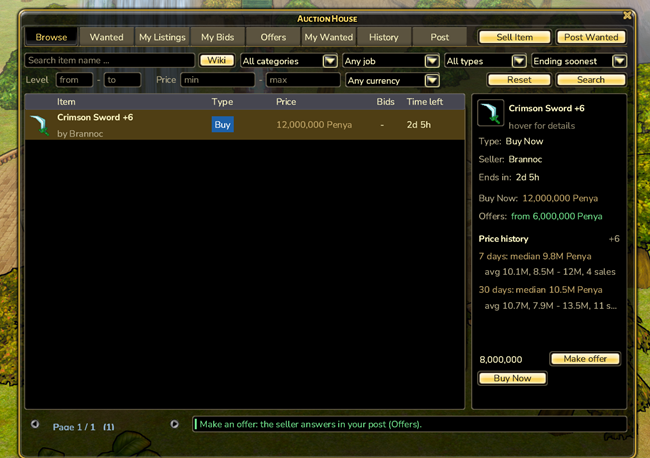
Auction House
Buy, sell, bid, trade and negotiate – even while the other side is offline.
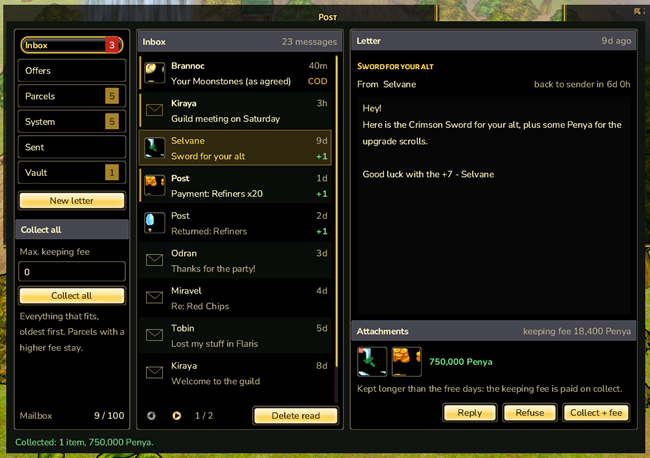
Letters, parcels with up to five items, cash on delivery and price negotiations – your mailbox for everything that reaches you while you are offline.
Chat
Custom tabs, a menu on every player name, profiles, reporting, history and a private chat with speech bubbles that keeps your conversations.