
Chat
Custom tabs, a menu on every player name, profiles, reporting, history and a private chat with speech bubbles that keeps your conversations.
The chat window on Orelia looks like the familiar chat bar, but does a lot more: tabs you set up yourself, a menu on every player name, a saved history and a private chat that feels like a modern messenger.
Tabs and send channel
At the top you get the tabs All, Chat, Party, Guild, Whisper and System. You can have up to 8 tabs, each with its own channels and its own send channel – right-click the tab bar to set them up. New messages in other tabs show up as a yellow number on the tab.
You send through the usual Chat, Whisper, Shout, Party and Guild buttons. Whisper fills in the last person you talked to, and switching channels keeps whatever you have already typed.
- Readableword wrapping, text shadow, a scrollbar and optional timestamps
- Mentionsyour name and your own keywords are highlighted, with a sound if you like
- Sizedrag up to 1280 × 800, presets Small, Medium, Large, Tall, font 8–14 pt
- Transparencybackground 0–100 %, optionally fades out on its own
When you scroll up, the chat shows “N new – click to jump down” so you never miss anything.
Clicking a player name
- Click: a menu with Whisper, Private chat, Profile, Add friend, party and guild invite, View equipment (when in sight), Send mail, copy name or message, Ignore and Report.
- Double-click: start whispering.
- Drag across lines: select them and copy with
Ctrl+C(Ctrl+Aselects everything). Special characters stay correct in other programs.
Profiles and reports
/profile name shows level, job, whether the player is online (and on which channel) and their guild – even when they are not near you. If they are on your channel, you also see their gear score.
Spot fake GMs
Real GMs carry the STAFF badge in their profile (when they are on your channel). If someone claims to be a GM and has no badge, report them.
/report name reports a player: pick a reason (spam, insults, scam/real-money trading, bot, offensive name, other), add a comment of up to 150 characters and, if you want, their latest lines from your chat. The team receives the report together with the evidence. You have to wait 30 seconds between reports and 10 minutes before reporting the same player again.
Filters and ignore
- Word filter: lines containing these words disappear completely, speech bubbles included.
- Shouts: optionally show only shouts from friends, party and guild.
- Ignore list: now kept after you log out, and it also covers Messenger messages. Manage it in the settings or with
/ignoreand/unignore. - System messages: have their own tab and can be hidden from mixed tabs.
History
Your chat is saved on your PC, one file per day, for 14 days by default (up to 90). After logging in you see the last 60 lines of your previous session, dimmed above a divider. The Chat History window (/chathistory) lists this session, every day and every conversation, with search, a channel filter and Copy all.
Private chat
Private messages and whispers now have their own conversation window:
- Speech bubblesyours on the right, date dividers (Today, Yesterday) and times
- Kept for goodsaved per character, 200 messages per contact by default
- Headername, online dot, channel, level, job and buttons for profile, friend, invite and history
- Messenger listunread conversations first, with “(3 new)” next to the name
If the other person is offline, the conversation shows “Not delivered – Name is offline.” with a Send as mail button that opens mail with recipient and text filled in. Whispers appear in the conversation too, outlined in yellow (can be turned off).
Away auto-reply
When your Messenger status is not Online, the client can answer with your own text – once per player every 10 minutes, marked [Auto-reply].
A few more touches: ↑/↓ brings back what you typed before, a counter shows how many characters still fit, double-clicking a bubble copies it, and a right-click offers copy, profile, mail, ignore, report and delete conversation. Sound, popup, message count and the auto-reply live under Private chat in the chat settings.
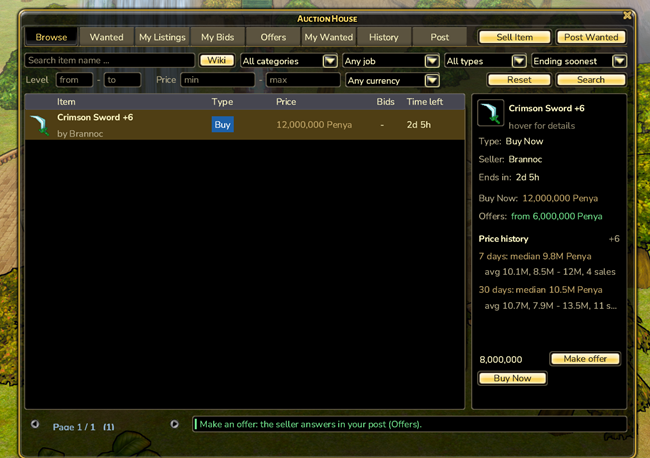
Auction House
Buy, sell, bid, trade and negotiate – even while the other side is offline.
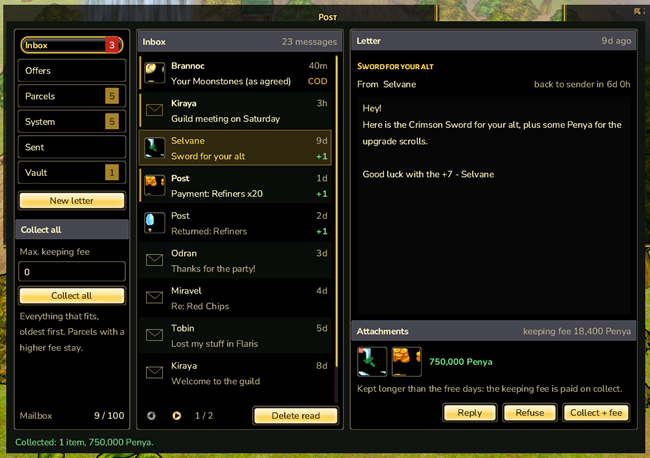
Letters, parcels with up to five items, cash on delivery and price negotiations – your mailbox for everything that reaches you while you are offline.
Party
Playing together actively pays off – with passive synergy instead of party skills, open parties and the Party Board to find a group fast.